

🚗 02. Garage & Vehicle Management (Garage & Vehicles)
Build and manage your candidate vehicle profiles.
When shopping for a car, we often hesitate between multiple shortlisted models. TrueCostAuto’s “Garage” functions as your dedicated vehicle notebook and sandbox for comparative evaluation.
📑 In This Guide
- Adding, Editing, and Archiving Vehicle Profiles
- Configuration Tips for Three Powertrain Types
- New vs. Used Cars: Key Configuration Differences
- On-Road Price, Subsidies, and Auto Loans
- Planning Annual Mileage and Ownership Duration
- Garage Capacity and Vehicle Switching
1. Adding, Editing, and Archiving Vehicle Profiles
In TrueCostAuto, each candidate car or vehicle currently owned can be saved as an independent Vehicle Profile.
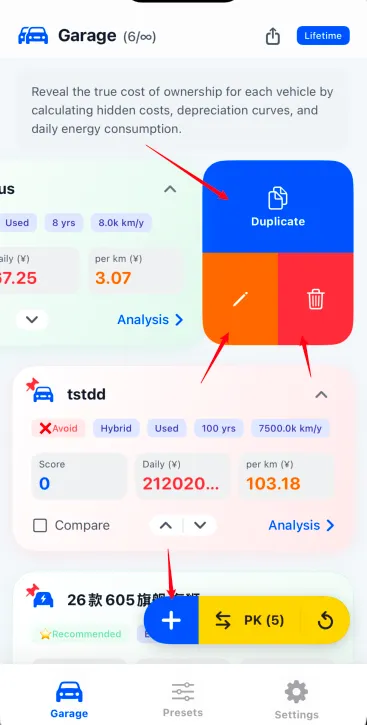
- Add New Vehicle: Tap the blue floating 「+」 button in the bottom action bar and follow the prompts to create a profile;
- Swipe Left for Quick Management: Swipe left directly on any vehicle card in the list to reveal the 3-action quick drawer (without needing to enter the details screen):
- 📋 Duplicate: Tap the top blue button to clone the complete vehicle profile. This is ideal for comparing different trim levels, option packages, or loan terms for the exact same model;
- ✏️ Edit Parameters: Tap the bottom-left orange pencil icon to modify vehicle price, insurance premiums, or efficiency values. All actuarial analysis reports update dynamically in real time;
- 🗑️ Remove Vehicle: Tap the bottom-right red trash icon to delete the vehicle profile from your garage.
2. Configuration Tips for Three Powertrain Types
Different powertrain architectures feature distinct energy consumption patterns and depreciation trajectories. TrueCostAuto models each with dedicated logic:
2.1 Battery Electric Vehicles (EV)
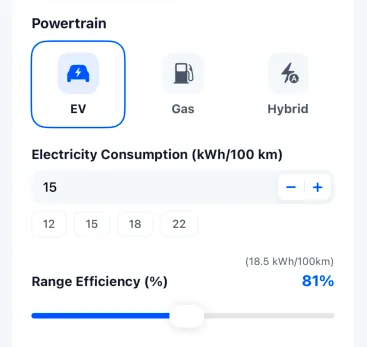
- Electricity Consumption (kWh/100km or mi/kWh): Enter the official rated or real-world consumption (compact SUVs typically range between 13–17 kWh/100km). Use the +/- stepper or quick preset buttons (12, 15, 18, 22);
- Range Efficiency %: Drag the slider to simulate real-world range degradation caused by freezing winter temperatures, highway aerodynamic drag, or heavy A/C usage (e.g., setting 81% dynamically recalculates effective consumption to 18.5 kWh/100km), ensuring rigorous financial forecasts;
- Charging Tariff: Each vehicle profile records consumption rate, while the Benchmark Electricity Rate is managed centrally in Presets (e.g., set to $0.10–$0.15/kWh if charging at home, or $0.30–$0.45/kWh if relying primarily on public fast chargers).
2.2 Internal Combustion Engine Vehicles (Gas/ICE)
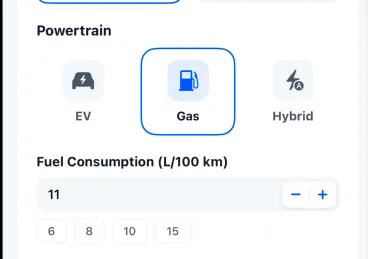
- Fuel Consumption (L/100km or MPG): Enter real-world combined fuel consumption based on verified owner data. Quick presets (e.g., 6, 8, 10, 15 L/100km) are readily accessible;
- Benchmark Fuel Price: Fuel efficiency is configured in the vehicle profile, while the Benchmark Fuel Price is managed globally under Presets. TrueCostAuto populates official regional benchmarks, which you can adjust to reflect your local gas station prices.
2.3 Plug-in Hybrids & Range Extenders (Hybrid / PHEV / EREV)
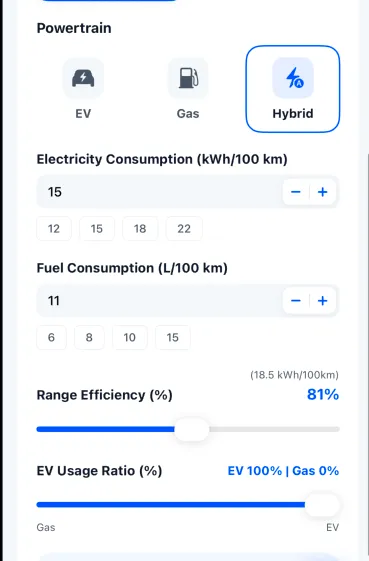
Hybrids can run on both electricity and gasoline, so their true cost depends heavily on your daily driving routine:
- Dual Energy Consumption Benchmarks: Input both electric consumption (kWh/100km) and depleted-battery fuel consumption (L/100km), with independent range efficiency sliders for the electric mode;
- EV Usage Ratio % Slider: Use the dual-ended slider to balance your everyday driving pattern:
- Urban Commute Focus: If you charge regularly at home and rarely take long road trips, set the slider to EV 80%–100%, significantly minimizing running costs;
- No Home Charging / Frequent Highway: If you lack home charging or drive long highway distances, set the slider to Gas 70%–80% to reflect realistic gasoline spending. The system blends electric and fuel costs proportionally according to your ratio.
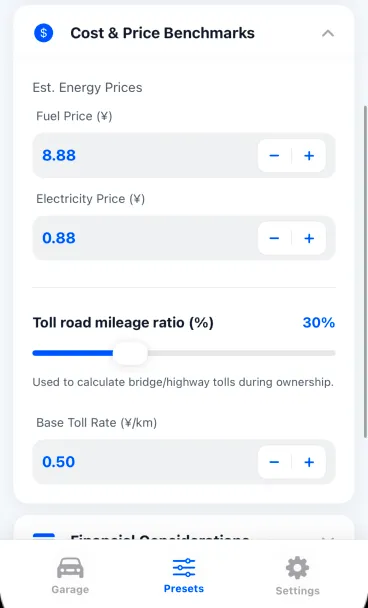
Each vehicle profile defines its own consumption efficiency. Global Fuel Prices, Electricity Rates, and Highway Toll Rates are centrally configured under Presets ➔ Cost & Price Benchmarks (shown below). Changing them updates every vehicle in your garage simultaneously.
3. New vs. Used Cars: Key Configuration Differences
When setting up a vehicle, accurately select whether it is “New” or “Used”, as this fundamentally changes tax liabilities and depreciation trajectories:
| Dimension | New Car | Pre-owned / Used Car |
|---|---|---|
| Sales / Purchase Tax | Assessed fully according to local statutory new car tax rates (with EV incentives applied) | Exempt from new car sales tax, requiring only nominal transfer and title fees |
| First-Year Depreciation | Suffers a steep initial cliff drop (typically 15%–25% loss in Year 1) | Bypasses the initial cliff drop, entering a much gentler, linear depreciation curve |
| First-Year Insurance | Insured at full original invoice price, resulting in higher initial premiums | Insured based on depreciated market fair value, lowering annual premiums |
4. On-Road Price, Subsidies, and Auto Loans
Acquiring a car involves several upfront expenditures that TrueCostAuto itemizes cleanly:
4.1 Purchase Price and Out-the-Door Expenses
- Agreed Vehicle Price: Negotiated vehicle selling price after dealer discounts;
- Purchase Tax & Vehicle Duties: Estimated automatically with manual override options;
- First-Year Insurance: Comprehensive coverage including liability, collision, and required state/provincial minimums;
- Title, License, and Documentation Fees: Official registration and dealership documentation charges;
- Government Subsidies & Manufacturer Rebates: Deduct clean vehicle tax credits, scrap bonuses, or trade-in allowances to arrive at your net cash outlay.
4.2 Cash Purchase vs. Auto Loan Financing
Is it more economical to buy in cash or finance with an auto loan? TrueCostAuto clarifies the financing balance sheet:
- Down Payment / Percentage: Specify your cash down payment (e.g., 20%, 30%, or 50%);
- Loan Term: Choose standard terms such as 12, 24, 36, 48, or 60 months;
- Loan Annual Percentage Rate (APR): 💡 Note: The baseline auto loan interest rate is inherited from Presets ➔ Financial Considerations. If your dealership offers promotional 0% APR or subvented financing, you can override the interest rate directly on that vehicle’s card. TrueCostAuto calculates the total cumulative interest paid over the financing life and amortizes it into your overall ownership ledger.
5. Planning Annual Mileage and Ownership Duration
Annual driving distance and planned ownership duration are the twin levers deciding whether an EV or gas vehicle is more economical.
The Presets page provides default Annual Mileage and Ownership Duration benchmarks to ensure all candidate cars are compared on an equal playing field. If you wish to test a unique operating scenario for a specific car, you can adjust these values independently inside its profile.
- Annual Mileage (km or miles/year):
- Under 8,000 km (5,000 mi): Low-frequency driving. Overall fuel expenses remain modest, and EV energy savings may struggle to offset higher upfront acquisition prices;
- 15,000 to 20,000 km (10,000–12,000 mi): Typical family daily driver. The operating savings of an EV or hybrid become distinct;
- Over 30,000 km (18,000 mi): High-mileage commuting or business usage. The ultra-low per-mile cost of an EV delivers tremendous long-term financial advantages.
- Ownership Duration (Years):
- Set according to your expected vehicle turnover cycle (e.g., 3, 5, or 8 years). The longer you retain the vehicle, the lower your annualized depreciation burden becomes.
6. Garage Capacity and Vehicle Switching
- Free Tier: Store up to 2 vehicle profiles concurrently—ideal for buyers deciding between their two favorite finalists;
- Pro Tier: Expands capacity up to 16 vehicle profiles, perfect for comprehensive multi-car comparisons, household fleet tracking, and automotive enthusiasts.
Once your profiles are saved, tap any vehicle in your garage to inspect its detailed financial health, or switch to the Comparison tab to pit them against each other in a head-to-head arena. Read more in 03. TCO Cost Analysis & Insights.