

🚀 01. Quick Start Guide (Getting Started)
Essential foundations when launching TrueCostAuto for the first time.
Welcome to TrueCostAuto! This guide takes you through the concept of vehicle Total Cost of Ownership (TCO) in just 3 minutes, showing you how to configure your regional preferences and perform your first vehicle cost analysis.
📑 In This Guide
- What is TrueCostAuto?
- Why Look Beyond the Sticker Price (What is TCO)?
- Configuring Your Region and Units
- Add Your First Vehicle in 3 Easy Steps
- Launch Your First Deep-Dive TCO Health Check
1. What is TrueCostAuto?
TrueCostAuto is an actuarial vehicle cost evaluation and decision-making platform designed for car owners and prospective buyers.
When purchasing a vehicle, many buyers focus solely on the “sticker price” or the monthly loan installment, frequently overlooking the ongoing expenses incurred throughout the ownership cycle:
- How severe is vehicle depreciation over time?
- How much do insurance, routine maintenance, parking, and tolls actually cost per year?
- Do fuel savings from an EV offset its higher upfront purchase price and potential insurance premium differences?
- What is the opportunity cost of paying all-cash instead of investing those funds?
TrueCostAuto answers these questions definitively. Using robust mathematical and financial models, it consolidates scattered expenses into an intuitive financial ledger, empowering you to calculate the complete picture and make rational buying choices.
2. Why Look Beyond the Sticker Price (What is TCO)?
In automotive finance, TCO (Total Cost of Ownership) represents the true net expense incurred from the day you drive off the dealer lot until you eventually sell or scrap the vehicle.
Think of car ownership costs as an iceberg:
- 🏔️ Visible Tip of the Iceberg: Vehicle purchase price, sales tax, initial title and registration fees.
- 🌊 Massive Submerged Ice Mass:
- Depreciation: The market value lost when selling the car years later (typically the single largest invisible expense);
- Energy & Fuel: Annual spending on electricity charging or gasoline;
- Fixed Running Costs: Ongoing comprehensive and collision insurance, annual maintenance, and replacement wear items;
- Transit & Toll Expenses: Highway tolls, parking fees, washing, and municipal fees;
- Financial Costs & Opportunity Loss: Auto loan financing interest, or the lost investment yield on cash tied up in an outright purchase.
Often, a gasoline car that appears “$3,000 cheaper upfront” may end up costing significantly more over 5 years than a hybrid or EV due to fuel consumption and steep depreciation. Conversely, models with stellar residual values and minimal maintenance costs can prove far more economical long term. This is the indispensable value of calculating TCO.
3. Configuring Your Region and Units (Presets)
When opening TrueCostAuto for the first time, navigate to the Presets tab to confirm your local country or region so the app can match local market conditions:
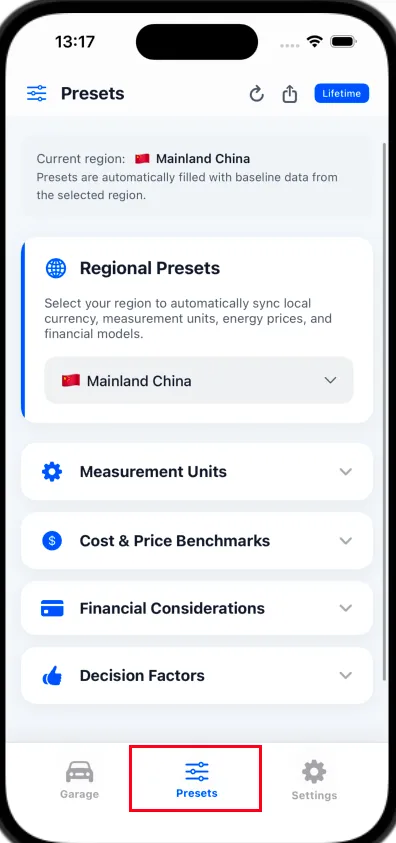
- Tap the Presets tab located in the center of the bottom navigation bar (highlighted by the red box above);
- In the Regional Presets dropdown menu, select your country or region (e.g., United States, China, Japan, Germany, United Kingdom, etc.);
- Upon selection, TrueCostAuto automatically loads regional currency symbols ($ / € / ¥), measurement units (km vs. miles, L vs. gal), benchmark fuel and electricity prices, and statutory tax rules;
- Fine-Tuning (Optional for Beginners): You can expand individual categories below to adjust specific parameters. However, beginners can safely keep the default benchmarks and refine them later during vehicle comparisons.
“Display Language” and “Driving Region” are completely decoupled:
- Region: Governs real-world economic conditions (local currency, fuel/electricity rates, tax policies, and depreciation curves);
- Language: Governs UI text presentation.
Example: If you live and drive in the United States but prefer reading in another language, set your Region to “United States” in Presets, and select your preferred language in Settings. You will enjoy a localized interface while maintaining 100% accurate US fuel rates, taxes, and per-mile financial metrics!
4. Add Your First Vehicle in 3 Easy Steps
Once your region is configured, let’s create your first vehicle profile:
Step 1: Basic Information & Powertrain
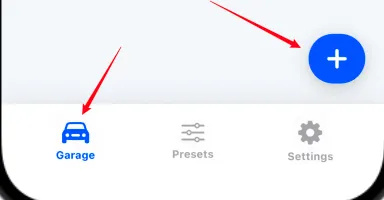
- Go to the Garage page and tap the blue floating 「+」 button in the lower right corner:
- Enter the vehicle name (e.g., “Model Y Long Range” or “RAV4 Prime”);
- Select the powertrain type:
- Battery Electric (EV): Focuses on power consumption and electric tariffs;
- Internal Combustion Engine (ICE): Based on real-world fuel economy and pump prices;
- Plug-in Hybrid / Range Extender (PHEV / EREV): Allows adjusting the electric driving ratio (e.g., 80% daily electric commuting, 20% gasoline road trips);
- Specify whether the vehicle is New or Used (used vehicles automatically waive new car sales tax and apply flattened depreciation curves).
Step 2: Acquisition Costs
- Enter the vehicle’s Negotiated Purchase Price;
- The app automatically estimates statutory Sales Tax and First-Year Insurance based on your regional presets. You can override these with figures from an official dealer quote;
- If government EV incentives or trade-in subsidies apply, enter them under “Subsidies/Discounts” to deduct them automatically.
Step 3: Usage Planning
- Estimated Annual Mileage: Typical private vehicles average 10,000 to 15,000 miles (or 15,000 to 20,000 km) per year;
- Planned Ownership Duration: Choose your expected holding period (e.g., 3, 5, or 8 years);
- If you do not wish to set subjective rating scores right now, simply tap Save in the top right corner to complete your vehicle profile!
Step 4 (Optional): Subjective Considerations and Scoring (Factors)
This step is completely optional:
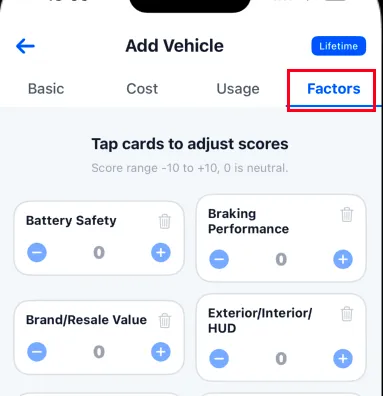
- Why use subjective scoring?
Car buying balances rational accounting with emotional enjoyment. If you have distinct personal preferences (e.g., prioritizing battery safety, loving the HUD/interior styling, or disliking specific brake feels), you can assign positive or negative scores to individual dimensions; - Scoring Range & Impact:
Scores range from -10 to +10 (0 is neutral). These ratings feed into the Purchase Recommendability Score (PRS), aligning recommendations with your taste; - Beginner Recommendation:
You can leave these at default and tap Save to finish. You can always revisit and fine-tune scores when comparing multiple models side by side.
5. Launch Your First Deep-Dive TCO Health Check
After saving, TrueCostAuto returns to the Garage screen. On your vehicle card, tap the Analysis > button in the bottom right corner:
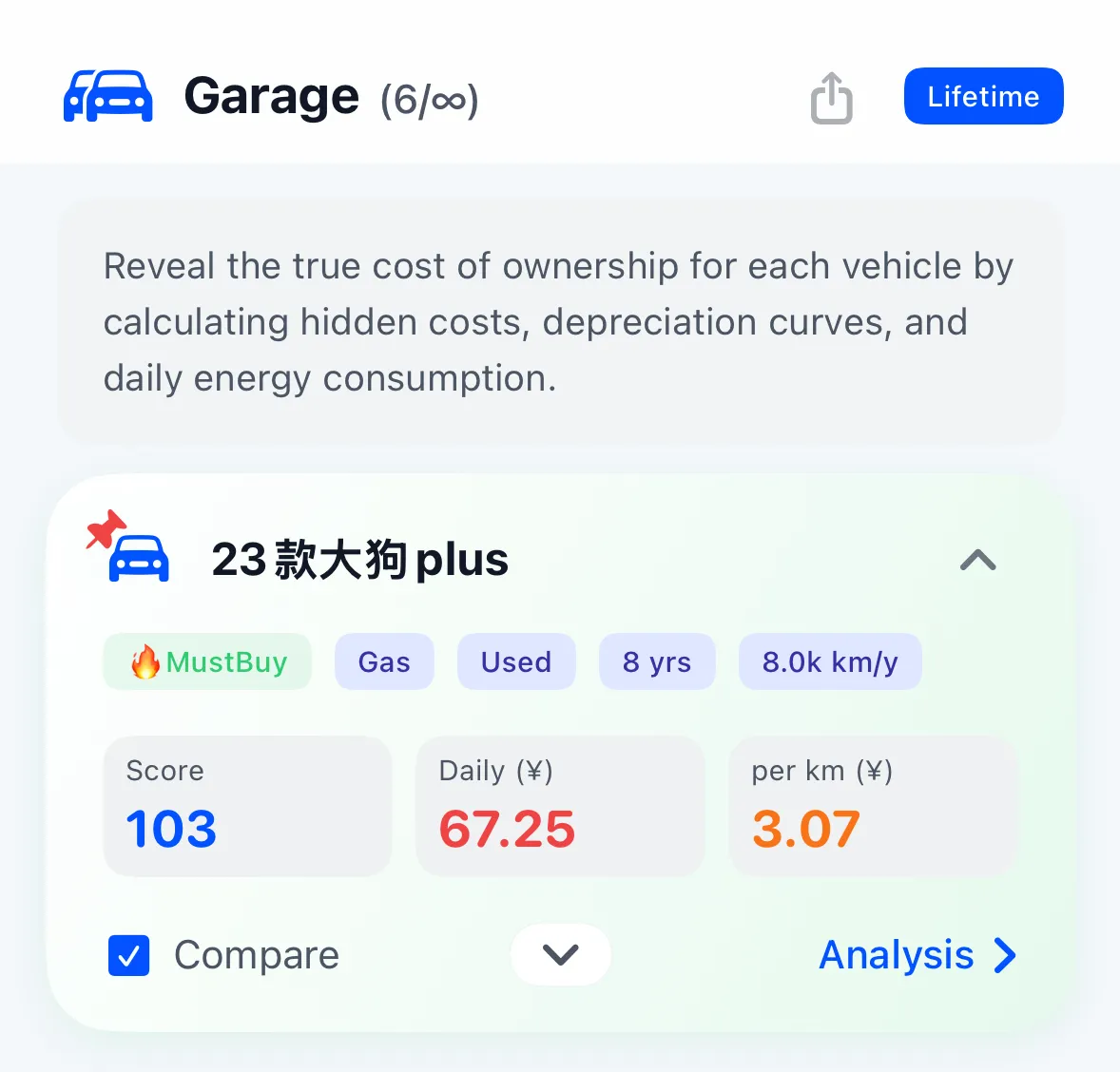
TrueCostAuto instantly generates a comprehensive TCO health report:
💡 Tip: Click the card to open a full in-page modal and scroll freely
- 📊 TCO Overview Dashboard:
- True Net Cost: Total cash outlay plus opportunity costs minus projected resale recovery value;
- Daily, Monthly, and Per-Mile/Km Cost: Clear breakdown into daily expenditure (e.g., $15/day), monthly cost (e.g., $450/month), and per-unit driving cost (e.g., $0.42/mi);
- On-Road Acquisition Expenses: Clear itemization of vehicle price, sales tax, first-year insurance, and registration fees.
- 📉 Cost Structure and Detailed Cards:
- Annual Operating Costs: Itemized breakdown of fuel/electricity consumption, tolls, routine maintenance, insurance, and parking;
- Depreciation & Residual Value: Dynamic actuarial curves projecting annual resale value and value retention trends;
- Hidden Opportunity Costs: Calculations estimating forgone investment returns on tied-up vehicle capital.
- 🎯 Multi-Dimensional Decision Health:
- Subjective Factors Summary: Clear review of personal satisfaction tags and ratings;
- Annual Expenditure Donut Chart: Clear percentage distribution of depreciation, energy, fixed costs, and potential losses;
- 5-Dimensional Health Radar: Comprehensive score across depreciation control, energy efficiency, maintenance burden, resale value, and durability;
- Ownership Duration Curve & Optimal Replacement Advice: Trend projection of average annual costs over 1–9 years, recommending the most economical year to upgrade.
Congratulations! You have mastered the fundamentals of TrueCostAuto. Continue to 02. Garage & Vehicle Management to learn about advanced loan modeling and fleet management.