



🚀 Extended Markdown & Engineering Diagram Specifications
FlashNote offers first-class rendering for technical documentation, system design, and engineering architecture. It deeply integrates the Mermaid industrial diagram engine and the KaTeX math system, complemented by interactive navigation and error tolerance.
1. Exclusive Interactive Rendering Features
When working with Mermaid diagrams or LaTeX math, FlashNote provides an integrated interactive toolkit:
- 🖐️ Freehand Pan & Drag: Hovering over diagrams turns the cursor into a grab hand, allowing unrestricted panning across the canvas;
- 🎯 Double-Click Viewport Reset: Double-click any empty canvas area to instantly restore initial centering and default zoom;
- 🔍 Full-Screen Lightbox: Click the magnifying glass in the top right corner to expand into a high-resolution lightbox with 30%–350% smooth zooming via mousewheel or touchpad;
- 💾 High-DPI Retina & SVG Vector Export: Export diagrams to crisp vector SVG or high-resolution 2x Retina PNG with padding and pure white backgrounds;
- 🛡️ Crash-Resistant Sanitizer (Mermaid Sanitizer): Built-in sanitizer intercepts unescaped brackets or typos within node labels, preventing page-wide whiteout crashes;
- ⌨️ KaTeX Quick Symbol Keyboard: Quick-insert buttons for Greek letters, calculus operators, matrices, and arrows.
2. Diagram & Visualization Specifications
Render interactive diagrams directly within Markdown without third-party graphics tools or external screenshots:
1. Mermaid (Flowcharts & Engineering Diagrams)
The industry standard for Markdown-native diagrams.
👉 Flowchart
graph TD
    A[Start] --> B{Registered?}
    B -->|Yes| C[Log In]
    B -->|No| D[Sign Up]
    D --> C
    C --> E[Dashboard]
    E --> F[Finish]

    style A fill:#f9f,stroke:#333,stroke-width:2px
    style F fill:#bbf,stroke:#333,stroke-width:2px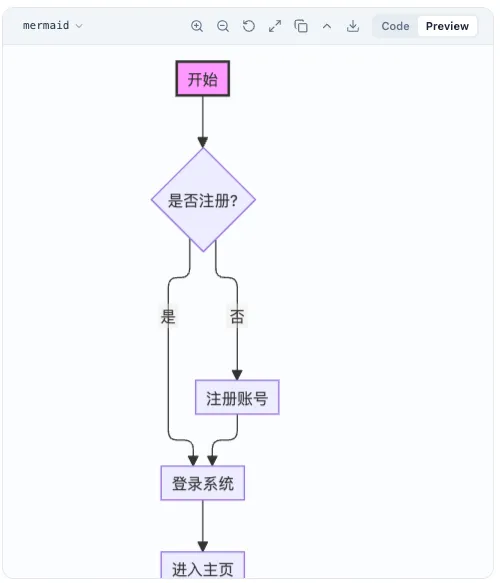
👉 Sequence Diagram
sequenceDiagram
    participant User
    participant Frontend
    participant Backend
    participant Database

    User->>Frontend: Click Login
    Frontend->>Backend: Request (POST /login)
    Backend->>Database: Query User
    Database-->>Backend: Return User Record
    Backend-->>Frontend: Return JWT Token
    Frontend-->>User: Login Success, Redirect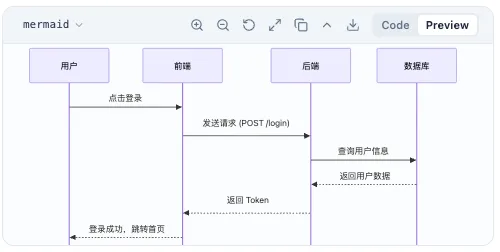
👉 Gantt Chart
gantt
    title Software Release Schedule
    dateFormat  YYYY-MM-DD
    section Planning
    Requirement Review   :done,    des1, 2026-01-01,2026-01-05
    Architecture Design  :active,  des2, 2026-01-06, 5d
    section Development
    Frontend Core        :         dev1, after des2, 10d
    Backend APIs         :         dev2, after des2, 8d
    section Release
    Integration QA       :         test1, after dev1, 5d
    Production Launch    :         milestone, 2026-01-28, 0d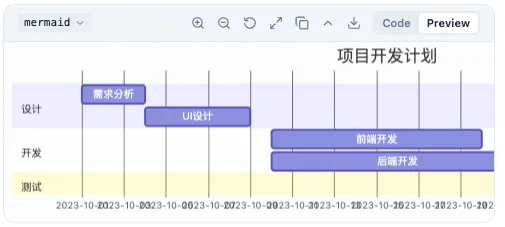
👉 Class Diagram
classDiagram
    class Animal {
        +String name
        +int age
        +breathe()
    }
    class Dog {
        +String breed
        +bark()
    }
    class Cat {
        +meow()
    }
    Animal <|-- Dog : Inherits
    Animal <|-- Cat : Inherits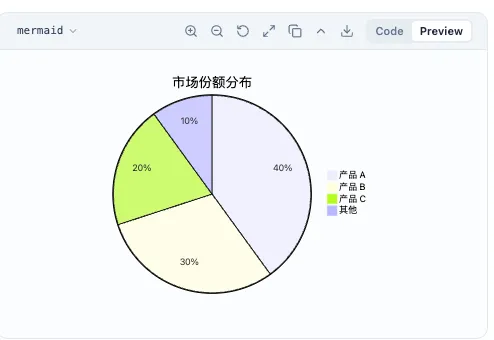
👉 State Diagram
stateDiagram-v2
    [*] --> PendingPayment
    PendingPayment --> Processing : Payment Verified
    PendingPayment --> Cancelled : Timeout
    Processing --> Shipped : Dispatched
    Shipped --> [*] : Delivery Confirmed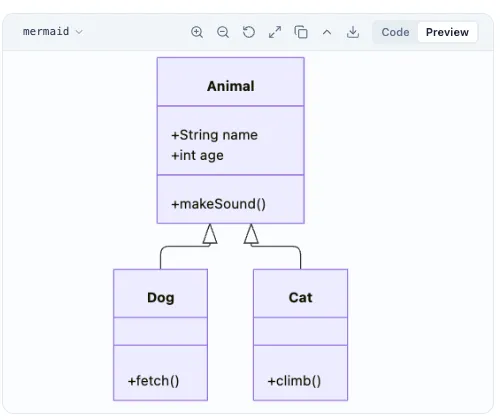
👉 Pie Chart
pie title Blog Traffic Distribution
    "Search Engines (SEO)" : 48
    "Social Media" : 26
    "Direct Referral" : 16
    "Direct Visits" : 10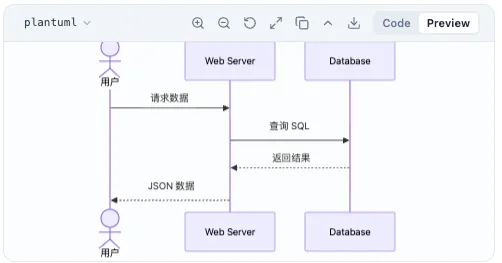
👉 Git Graph
gitGraph
    commit id: "v1.0.0"
    branch feature-editor
    checkout feature-editor
    commit id: "Add Tiptap"
    commit id: "Add Mermaid"
    checkout main
    merge feature-editor id: "Merge feature"
    commit id: "v1.1.0" tag: "v1.1.0"
2. PlantUML
For architectural blueprints, standard PlantUML text syntax is also supported:
@startuml
skinparam handwritten false
actor User
boundary Browser
control Server
database Database

User -> Browser: Open FlashNote
Browser -> Server: Request TOC
Server -> Database: Query Metadata
Database --> Server: Return Entities
Server --> Browser: Render Tree
@enduml
3. Metadata & Document Callouts
1. YAML FrontMatter
Used at the top of Markdown files for static blog compilers and publishing pipelines:
---
title: Engineering Modern Web Architectures
date: 2026-10-14 10:00:00
categories:
  - Architecture
tags:
  - TypeScript
  - Vite
  - Astro
author: Fisher
published: true
---
2. GitHub & Obsidian Callout Blocks
Format callouts with blockquote headers:
Informational context and background technical notes.
Performance Tip: Enabling local sandbox caching improves offline image loads by up to 80%.
Verify your WebDAV endpoint has write permissions before initiating sync.
Warning: Changing primary keys will trigger cascading outline updates.
Dangerous action: Purging database will permanently wipe local IndexedDB stores.
4. Academic Typography & Math
1. KaTeX Matrices & Systems of Equations
Inline math and matrix transformations:
2. Task Lists & Rich Text
- Instant sidebar note-taking
- 4 distinct viewing modes
- De Morgan’s Laws LaTeX to Unicode conversion
- Third-party image host plugin integration