



Here is a comprehensive Markdown syntax and layout demonstration. To help you both appreciate the rendered output and understand how it is written, each section provides live rendering alongside syntax explanations.
At the end of this document, you will also find a complete raw Markdown block that you can copy with one click.
📚 Markdown Comprehensive Showcase
1. Headers
Markdown supports 6 levels of headings indicated by the number of # characters.
Heading 1 (H1)
Heading 2 (H2)
Heading 3 (H3)
Heading 4 (H4)
Heading 5 (H5)
Heading 6 (H6)
Syntax:
# Heading 1,## Heading 2…###### Heading 6
2. Text Formatting
Apply formatting to words and inline phrases:
- This is bold text
- This is italic text
- This is bold and italic text
This is strikethrough textThis is inline code- This is underlined (using HTML tags)
- This is highlighted text (supported in some editors)
Syntax:
**bold**,*italic*,***bold italic***,~~strikethrough~~,`inline code`,<u>underline</u>,==highlight==
3. Lists
Bulleted Lists
- Apples
- Bananas
- Nested banana variety 1
- Nested banana variety 2
- Oranges
Numbered Lists
- Step One: Open editor
- Step Two: Type Markdown syntax
- Step Three: Export as HTML or PDF
Task Lists
- Completed task
- Incomplete task
- Another pending item
Syntax:
- Unordered:
- Itemor* Item- Ordered:
1. Item,2. Item- Task:
- [ ] Incomplete,- [x] Completed
4. Blockquotes
This is a standard blockquote. It can span multiple lines seamlessly.
This is a nested blockquote. Just like Russian nesting dolls.
Blockquotes can also embed other elements, such as:
- List items
Inline code- Bold text
Syntax: Use
>for quotes, and>>for nested quotes.
5. Code Blocks
Inline code uses backticks: console.log("Hello World");
Multi-line code blocks use three backticks, with language specified for syntax highlighting:
def fibonacci(n):
    """Compute Fibonacci sequence"""
    if n <= 1:
        return n
    return fibonacci(n - 1) + fibonacci(n - 2)

# Print first 10 numbers
for i in range(10):
    print(fibonacci(i), end=" ")
print()
// JavaScript sample
const greet = (name) => {
console.log(`Hello, ${name}!`);
};
greet("Markdown");Syntax: Start with
.language</code> and end with <code>
6. Links & Images
- Standard Link: Visit GitHub
- Link with Title: Visit Google
- Image:
- Image as a Link:
Syntax:
- Link:
[Label](URL "Optional Title")- Image:
- Clickable Image:
[](Destination URL)
7. Tables
| Left Aligned | Center Aligned | Right Aligned | Default Alignment |
|---|---|---|---|
| Cell 1 | Cell 2 | Cell 3 | Cell 4 |
| Bold | Italic | Code | |
| Long text wraps based on display width | Data | 100 | 200 |
Syntax: Delimit columns with
|and header with-.:---for left,:---:for center, and---:for right.
8. Horizontal Rules
Create horizontal dividers using three or more -, *, or _ characters:
9. Extended Syntax
(Note: Requires enhanced Markdown renderer support, such as Typora, Obsidian, GitHub, or Notion)
📌 Footnotes
Here is a sentence referencing a footnote1. Another footnote reference here2.
📐 Mathematical Formulas (Math / KaTeX)
Inline formula: Mass-energy equivalence is a fundamental relation.
Block equation:
📊 Diagrams (Mermaid)
graph TD
    A[Start] --> B{Understand Markdown?}
    B -->|Yes| C[Begin Writing!]
    B -->|No| D[Read this guide]
    D --> B
    C --> E[Done]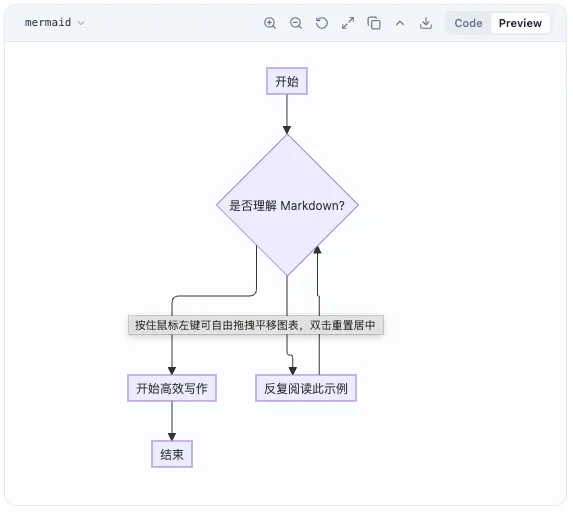
😀 Emoji
Unicode emojis or shortcodes (depending on renderer): 🎉 🚀 💡 ✅ ❌
📥 Appendix: Complete Markdown Source
You can click “Copy” in the code block below to copy this entire source into your editor.
# 📚 Markdown Comprehensive Showcase
## 1. Headers
# Heading 1 (H1)
## Heading 2 (H2)
### Heading 3 (H3)
#### Heading 4 (H4)
##### Heading 5 (H5)
###### Heading 6 (H6)
---
## 2. Text Formatting
- **Bold text**
- _Italic text_
- _**Bold and italic**_
- ~~Strikethrough~~
- `Inline code`
- <u>Underline</u>
---
## 3. Lists
- Apples
- Bananas
- Oranges
1. First
2. Second
- [x] Done
- [ ] Todo
---
## 4. Blockquotes
> Standard quote
>
> > Nested quote
---
## 5. Code Blocks
```python
def fibonacci(n):
return n if n <= 1 else fibonacci(n - 1) + fibonacci(n - 2)
print(fibonacci(10))
```
---
## 6. Links & Images
- [GitHub](https://github.com)
- 
---
## 7. Tables
| Left | Center | Right |
| :--- | :----: | ----: |
| A | B | C |
---
## 8. Horizontal Rules
---
---
## 9. Extended Syntax
### 📌 Footnotes
Sample footnote reference[^1].
[^1]: Footnote content.
### 📐 Math (KaTeX)
$$
\int_{-\infty}^{\infty} e^{-x^2} dx = \sqrt{\pi}
$$
### 📊 Mermaid
```mermaid
graph TD
A[Start] --> B[Finish]
```
### 😀 Emoji
🎉 🚀 💡You can copy the raw markdown above into your editor to test rendering support.