
📚 BookFun Help Center
Welcome to the BookFun 2.2 Help Center! Whether you’ve just downloaded the app and want to import books, or wish to explore the floating audio capsule, scrape high-res covers, or auto-sync serial chapters from your cloud drive, you’ll find everything you need right here.
 | 01. Quick Start (Getting Started) Essential essentials when opening the app for the first time. • Understanding the 3 bottom tabs: Bookshelf, Store, Profile • How to add your first book • Handling duplicate book imports • Opening books and smooth page turning • Activating TTS narration and floating capsule • Beginner FAQ quick lookup |
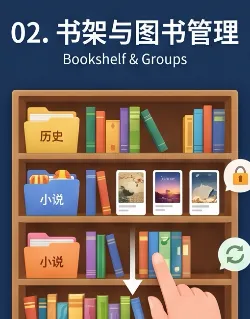 | 02. Bookshelf & Groups Daily book organization, categorization, and security. • 3D Study Room and Clean List views • Organizing books with group folders • Quick search, sorting, and hiding books • Long-press book card: metadata scraping and actions • Creating your own Markdown books • Safety lines: removing from group and deletion protection |
 | 03. Reader & Typography Distraction-free, seamless high-quality reading. • Publication-grade typography: punctuation and alignment • Page-turn feel: horizontal slide and flip • Seamless chapter transitions: read smoothly to the end • Table of contents, full-text search, volume pinning • Sentence highlighting, notes, and one-tap export • Never lose your spot: ‘Back to Position’ capsule • Scientific eye-care tinting and night blue-light filter |
 | 04. Audiobook & TTS Double-tap anywhere to listen, gentle bedtime reading companionship. • Super-fast ways to start listening • Offline system voices and expressive cloud anchors • Natural speech chunking without awkward pauses • Full-screen floating mini audio capsule • Synchronized viewport scrolling and yellow sentence highlight • Speed controls and sleep timer • Word-level breakpoint memory, background audio, and headphone controls |
 | 05. Sync & Backup Keep your data in your own hands; effortless migration to a new device. • Automatic seamless sync across Apple devices • Connecting home NAS or Baidu Drive for auto-sync • Local data backup and restore with item selection • Shareable backup and version protection • Core breakdown: what is included in each backup mode? • How to safely restore backups without accidental overwrites |
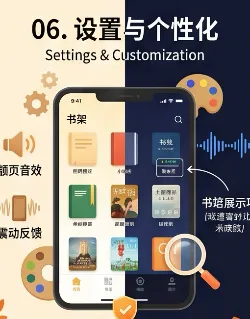 | 06. Settings & Customization Centralized preference management, tailored for your reading needs. • Light/Dark modes linked to reader themes • Page-turn sound effects and haptic toggle • Bookshelf display items and metadata density • Cover search engine priorities and toggle • Chapter splitting and regex proofreading dictionaries • Safe cache cleanup and database self-healing checks |
 | 07. Troubleshooting & FAQ Encountered an issue? Here are the most effective solutions. • Automatic TXT encoding detection and chapter splitting • Cover scraper tips: simplifying keywords and switching engines • Audio stops in background? Checking Low Power Mode • Devices not syncing? Manual trigger guide • Local network storage (SMB/WebDAV) diagnostics • Accidentally deleted a book? Re-import to recover progress and notes |
📖 Advanced Topics & Full Reference
Beyond the 7 core guides above, deep-dive reference materials are available:
- 🖼️ Cover & Scraper: Master multi-engine cover search and 0.72 golden ratio auto-cropping for physical-book elegance;
- 📊 Reading Stats: Independent timers for reading and listening, colorful today’s Treemap, and dedicated 3D book archives;
- 📘 BookFun 2.2 Full Manual: Comprehensive manual detailing every feature, perfect for bookmarking.
Tip
You can also quickly switch between guides using the top navigation bar.