
🖼️ Cover & Scraper
Give every book on your shelf publication-grade physical book aesthetics.
Category: Advanced Guide · Estimated Reading Time: 3 minutes
Many downloaded web novels or plain-text files come without covers or carry distorted, low-resolution thumbnails. BookFun 2.2 features a dedicated cover scraper and golden ratio auto-cropping system. This guide explains how to easily furnish your collection with crisp, hardcover-style covers.
📑 In This Guide
- Strengths of the 3 Major Search Engines
- Automatic Title Purification: Why Matches Are So Accurate
- 0.72 Golden Ratio: The Secret to Zero Distortion
- Custom Covers from Your Photo Library
- One-Tap Shelf Auto-Scraper: Completing Missing Covers
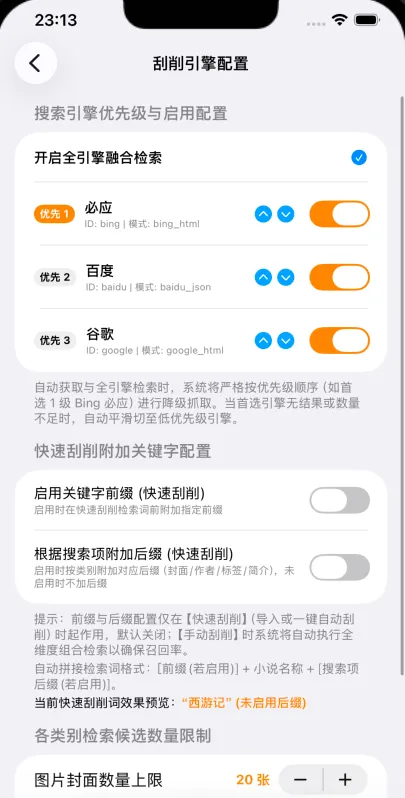
1. Strengths of the 3 Major Search Engines
Long-press any book on your shelf and choose “Change Cover”, or tap “Online Cover Search” in reading settings to open the Scraper Center:

- 🇨🇳 Baidu Images: Outstanding hit rates for domestic serials, web novels, and fantasy sagas;
- 🌐 Microsoft Bing: Exceptional for classics, humanities, non-fiction, and foreign literature with clean, watermark-free images;
- 🌍 Google Images: Comprehensive global coverage for light novels, translated works, and international editions;
- Priority Reordering & Offline Mode: Reorder engine search priority in settings, or toggle them all off for a 100% offline reading sanctuary.
2. Automatic Title Purification: Why Matches Are So Accurate
Raw eBook filenames often carry noise like Dream_of_the_Red_Chamber[Complete_Edition]_TXT_Author_Cao.txt. Querying raw filenames directly rarely yields high-quality book covers.
BookFun runs an automatic text purification pipeline in the background:
- Strips out web encoding artifacts like
&; - Identifies and removes prefixes like
"Author:"or"By:"; - Eliminates noise tags like
"[Verified Final]"or"TXT Download", extracting the pure title to search with pinpoint accuracy!
3. 0.72 Golden Ratio: The Secret to Zero Distortion
Ordinary readers stretch wide images into tall rectangles, distorting character faces and text.
BookFun standardizes on the 0.72 golden ratio (Width : Height ≈ 1 : 1.39) used in physical hardcover publishing:
- When an online image is selected, the system automatically centers and crops it proportionally;
- Non-proportional stretching is strictly prevented, ensuring all book cards on your shelf align uniformly and elegantly.
4. Custom Covers from Your Photo Library
- Use Personal Posters & Art: Found a beautiful poster or fan illustration? Tap “Choose from Photos” to upload and crop it directly;
- Native Embedded Cover Extraction: When importing EPUB or Kindle books that contain embedded artwork, BookFun extracts the official cover automatically.
5. One-Tap Shelf Auto-Scraper: Completing Missing Covers
Imported dozens of books and don’t want to search covers one by one?
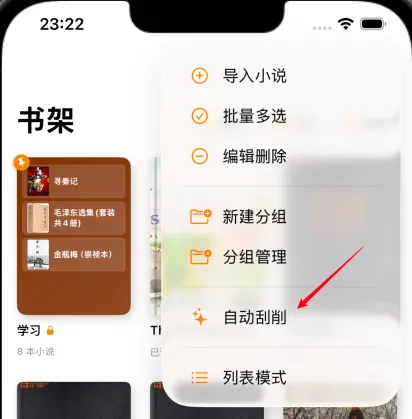
- One-Tap Automated Completion: Tap the “More Menu (
···)” in the top-right corner of the bookshelf and select “Auto Scrape”; - Intelligently Scans Uncovered Books: Scans for all books lacking covers and matches high-resolution covers in the background;
- Synchronous Metadata Ingestion: Enriches author profiles and synopses simultaneously, instantly transforming a plain list into a private library!
Continue exploring with:
- 📊 Reading Stats: Admire your 3D cover cards in book archives;
- 📁 02. Bookshelf & Groups: Explore dual views and group folders.